The Collider Painter editor: hull list, stats bar and preview settings beside the viewport.
Why it exists
Collision that matches the shape you meant
Automatic collision treats a mesh as one problem. Collider Painter lets you say which parts matter, then proves the result in the viewport and in numbers.
Paint, then fit
Each part gets its own collision
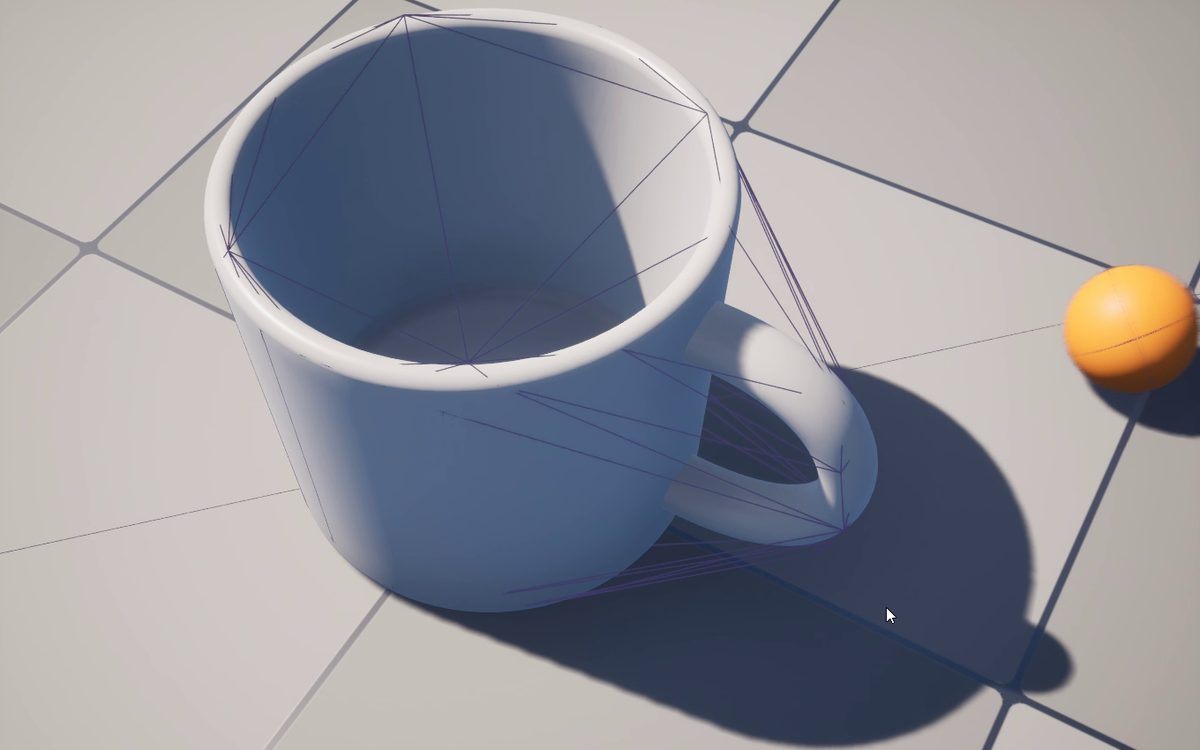
One convex hull around a mug closes the cup and fills the handle’s loop: a ball rests on an invisible lid and a rod stops in the handle.
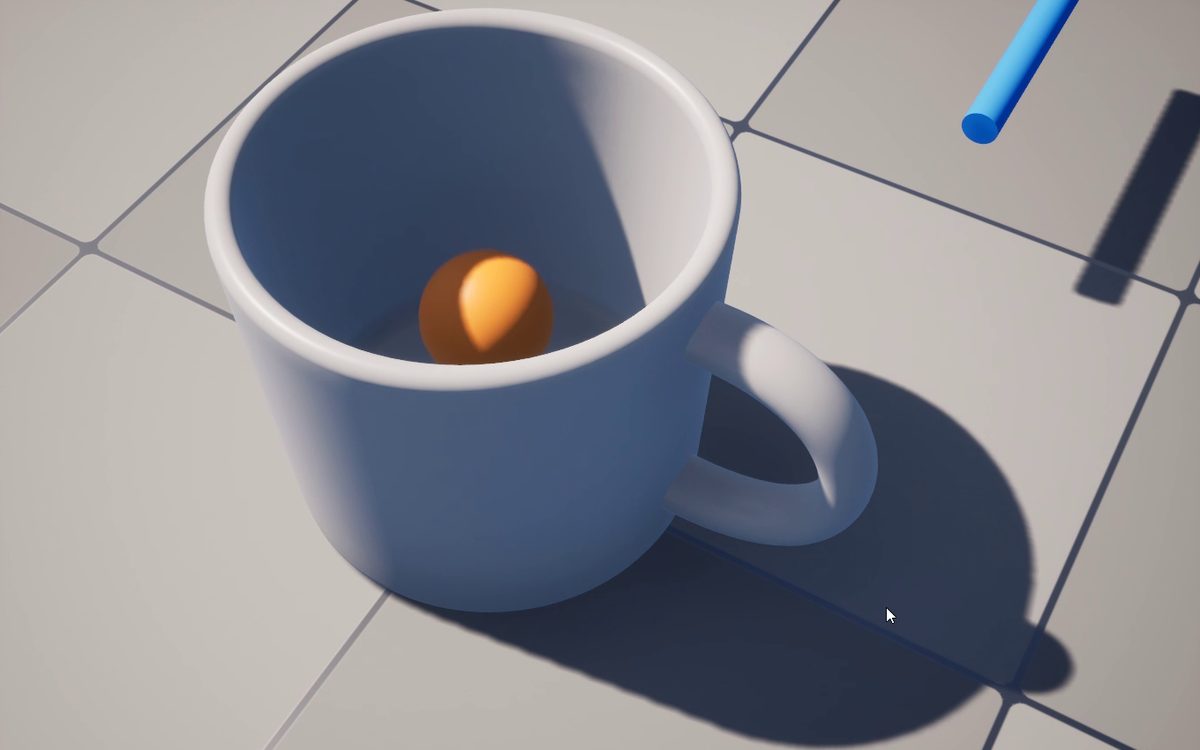
Paint the cup and the handle as two hulls and each is fitted or decomposed on its own, so the opening stays open.
In the recorded session, after the bake, the same ball drops into the cup and the rod passes through the handle.
Before
One convex hull spans the opening.
After
Ball in the cup, rod through the handle.
Bake
Native collision, nothing extra at runtime
Bake writes Unreal’s own simple collision: boxes, spheres, capsules and convex elements on Static Meshes, bodies on Physics Assets, and per-piece Chaos collision on Geometry Collections.
Your painted regions stay editable as editor-only data and are stripped when the game is cooked. Collision you made by hand is kept unless you choose Replace All Collision.
A pistol’s single box blocked shots through its trigger guard. Two boxes, on the slide and the grip, let the same shots through.
Two fitted boxes on a template pistol: slide and grip.
QA
Measured, not eyeballed
QA samples the distance between the collision and the render surface and colours it on the mesh: red where collision sticks out, blue where it falls short.
A staircase’s single convex measured 14.68 cm (sampled Hausdorff). With Protect Walkable Clearance and Auto, it measured 0.00 cm.
Distances are sampled at render vertices. They tell you where to look; they are not a continuous guarantee.
Before
Existing collision: red steps, 14.68 cm.
After
Ten convex elements, 0.00 cm.
Features
One tool for every kind of collision
Paint and select
Brush with radius and falloff, erase, flood by normal angle, connected regions, material slots, UV islands, polygroups, box, lasso and mirror symmetry.
Fit primitives
Box, sphere, capsule, cylinder or convex hull, fitted to exactly the painted triangles, with Live Fit while you paint.
Auto decomposition
CoACD, Unreal’s native decomposition and primitive subdivision on the CPU, with Draft, Balanced and Precise presets. Optional CuACD on NVIDIA GPUs.
Bake, import, export
Bake native simple collision without touching shapes you made by hand. Import UCX_, UBX_, USP_ and UCP_ collision from FBX or OBJ, and export to FBX.
QA overlays
Distance heatmap, walkable faces and overlap pairs, with sampled Hausdorff and Chamfer distances and a cost estimate in the stats bar.
Characters and ragdolls
Generate Character builds bodies and joints limited by bone type. Bone rules and Skeleton Profiles describe any rig, tentacles included.
Geometry Collections
Generate All Pieces gives every fractured piece its own native Chaos collision, with per-piece overrides and a native fallback.
Recipes and batch
Apply a recipe to many meshes in the background, preview with Dry Run, export a CSV report, or run the CPApplyRecipe commandlet in a pipeline.
Runtime and scripting
Generate Collision Async for Dynamic Mesh, Procedural Mesh and runtime Static Mesh targets. Python, Blueprint and console commands drive the editor.
How it works
Paint, fit, bake, check
The whole loop runs in one editor window, and every step can be undone.
Paint
Add a hull and paint the triangles it should cover: B paints, Shift erases, Ctrl floods a whole smooth part.
Fit
Choose Box, Sphere, Capsule, Cylinder or Convex and press X to fit, or Y to decompose a concave part.
Bake
Ctrl+Shift+B writes native simple collision. Save the mesh to keep it.
Check
Ctrl+Shift+Q runs QA; Alt+Shift+3 shows the distance heatmap.
Hulls are named, coloured regions of the mesh. A Ctrl+click floods a whole smooth part, inside and out; material slots, UV islands and polygroups select in one click too.
Hull list with type, triangle, vertex and cost columns, visibility, solo and lock.
Mirror hulls follow their source across a mesh axis until you break the link.
After a reimport, painted regions are remapped; anything that cannot be is kept for review.
The cup painted with one Ctrl+click: the flood stops at the handle.
Characters and ragdolls
A Physics Asset that is meant to ragdoll
Generate Character gives a recognised skeleton bodies on its major joints and limits each new joint by what the bone is: knees and elbows hinge one way, hips and shoulders are ball joints, the spine bends a little.
For rigs the names do not explain, bone rules say what each bone is. Save them in a Skeleton Profile, set it as the default, and every character on that rig generates the same way. Right-click a bone in the Skeleton Tree to set its joint type.
Skeleton Tree and generated bodies on the UE Mannequin. Twist bones are greyed out: their skin counts for the joint above them. Captured during development, before joint types were shown in the tree.
Bone
Joint
Swing 1
Swing 2
Twist
Calf, shin
Hinge
0–140
locked
locked
Forearm
Hinge
0–145
locked
locked
Thigh
Ball
60
30
25
Upper arm
Ball
80
60
40
Spine
Cone
15
15
15
Geometry Collections
Collision that follows every piece
Generate All Pieces decomposes each rigid piece on background workers and bakes native Chaos collision, with progress and Cancel.
A piece that CoACD refuses is retried with Unreal’s own solver. A piece that still fails keeps the collision it had and is named in the result; every other piece is baked as usual.
Chaos’s collision view. Left: the default per-piece hulls fill the handle’s loop. Right: after Generate All Pieces, the hulls follow each piece.
Recipes and batch
Collision for a whole folder
Select meshes in the Content Browser and apply a recipe: Prop, Vehicle, Building, VR Grabbable, Walkable, or your own recipe asset. It runs in the background with a Cancel button, and each mesh is baked as its result arrives.
Dry Run reports without changing any collision.
Replace All Collision also removes shapes the plugin did not make.
The CPApplyRecipe commandlet runs the same recipes from a build script.
The Prop recipe on three template props that shipped without collision.
Runtime
Collision for meshes built during play
The Generate Collision Async node copies a Dynamic Mesh, Procedural Mesh or runtime Static Mesh on the game thread, solves on a worker and applies native collision before On Complete fires.
The graph on the right is live: drag to pan, scroll to zoom. Copy Blueprint puts the nodes on your clipboard so you can paste them into a Blueprint whose parent class is Dynamic Mesh Actor.
Editor scripting library and runtime collision jobs
Dependencies
None for CPU use. Procedural Mesh support uses Unreal’s optional ProceduralMeshComponent plugin. GPU acceleration is optional: a separately built CuACD library for NVIDIA GPUs, editor only, Windows and Linux.
Test evidence
What was built and what was run on each platform is listed on the Compatibility page of the documentation.
Changelog
What’s new
1.0.0First version
Static Mesh, Skeletal Mesh and Geometry Collection collision editors, and a Collider Painter mode in the Level Editor.
CPU decomposition with CoACD, Native Unreal and Primitives backends; optional CuACD GPU acceleration in the editor.
Character generation with joint limits by bone type, bone rules and Skeleton Profiles.
Collision recipes, batch apply, the CPApplyRecipe commandlet, and FBX/OBJ collision import and FBX export.
Runtime generation for Dynamic Mesh, Procedural Mesh and transient Static Mesh targets.
No. A normal bake replaces only the collision Collider Painter made before and keeps every other shape. Replace All Collision is an explicit option, and the Content Browser’s option switches itself off after each run.
Does my packaged game need anything from the plugin?
Not for baked collision. Bake writes Unreal’s native simple collision, and the painted regions are editor-only data that is stripped when the game is cooked. You only need the plugin’s runtime module if you generate collision while the game runs.
Do I need an NVIDIA GPU or CUDA?
No. Every solver runs on the CPU. CuACD GPU acceleration is an optional, separately built library for the editor; when it is not available, Turbo falls back to CPU CoACD and says so.
Can I generate collision while the game is running?
Yes, for Dynamic Mesh Components, Procedural Mesh Components and Static Meshes created at runtime with CPU-readable data. The solver runs on a worker thread; applying the collision happens on the game thread, so very large meshes can still cause a short stall. Content assets should be baked in the editor instead.
Does it work with characters and ragdolls?
Yes. Generate Character creates bodies and joints on a Physics Asset, keeps bodies and joints that already exist, and limits new joints by bone type. Bone rules and Skeleton Profiles cover rigs whose bone names are not standard.
Can I process a whole project?
Yes. Apply a recipe to a Content Browser selection, or run the CPApplyRecipe commandlet with -DryRun first to get a CSV report without changing anything.
What about very dense or Nanite meshes?
By default, when a mesh’s source geometry exceeds 200,000 triangles, authoring uses the engine-built Nanite fallback mesh instead. The threshold and the source are settings.
Is it a remesher for broken scans?
No. Its cleanup welds vertices, removes bad faces and closes simple holes. Complex scans may need remeshing in another tool first. See Known limitations.
Paint the collision you meant.
Unreal Engine 5.5 – 5.8. Full documentation, from the first hull to runtime generation.